If there is one thing that I’ve found over the years that can help improve catch rates it is keeping track of what you are catching. I don’t know a single commercial fisherman that doesn’t keep records of what was caught, when and how! I’ve been doing the same for the past 11 years and it’s meant that on days when others are struggling to catch anything we’ve been able to nip out and get a feed in minutes. It’s also how I’m able to put people who are having a really bad day on a few fish, even on the toughest of tide/weather combos.
You can download the Fishing Log using this link:- Download Free Offline Fishing Log With Data Export
Anyway I’ve decided to share the spreadsheet I use for this. I know there are plenty of apps for recording fish catches but they all do one thing I don’t like, storing the data on a server. There’s not a lot of money in this so what happens when they get bored and stop supporting the app, stop paying for the server? You lose everything. That’s why I went down the spreadsheet route, plus it’s also easier to update quickly. The way I’ve done it also gives you a lot of flexibility on how you record your data, plus there are easy 1 click options for exporting to Google Earth and GPX file formats for importing in to your GPS unit. After 11 years of doing this I have literally thousands of catch records that will point me in the right direction in any given day or just as importantly keep my clear of baron areas.
The easiest way to do all this is simply to take a picture of your catch with your location enabled. You can then update things in a few minutes in the warmth and comfort of home.

Fishing Log Data
Date & Time: The date and time you caught the fish/or didn’t for that matter (I log blanks as well). Formatted in dd/mm/yyyy hh:mm:ss (required)
Closest High Tide: Date and time of the closest high tide in format dd/mm/yyyy hh:mm:ss . Not required but if entered is used to automatically show the tide state when the fish was caught.
Tide Height: Height of the high water in the previous column. Optional and feel free to record this however you like, feet, meters, simple description (spring/neap etc)
Water Temp: Optional again. Not really used unless you are boat fishing and have access to the water temp from the sounder. Again enter however you like.
Cloud Cover: Optional. Cloud/light levels. Text so just enter as you like, e.g. None, Overcast, Heavy Fog etc
Rain: Optional. Only seems important in shallow water I’ve found but still worth recording. Sometimes a shower of rain really turns the feed on so it’s worth recording.
Wind Direction: Optional. Plain text so enter how ever you like. I generally use simple descriptions, east, north west etc (Hint: in 11 years I’ve found the east wind making zero difference to catch rates ;))
Wind Strength: Optional. Again you can record this how you like or not at all. I normally go on the standing shipping forecast e.g. 1, 1-2 etc
Water Clarity: Optional. A scale of 1-10, where 10 is as clear as it gets in your local area. Just a guesstimate but again with it having a massive affect it’s worth recording something.
General Area: Optional. Got a spot you fish that you have your own name for. Fish a headland regularly. Just a general name for the area you were fishing when you caught the fish/blanked. Plain text so record it however you like.
Lat: Latitude of where you caught the fish. If you were clever and took a picture on your phone you should have this information saved with the image. You can enter this in either **.******* format (the same as Google earth/how phones record it) or in standard GPS system notation **.**.*** Either work fine. If using GPS format and going south of the equator please use a minus sign e.g. -**.**.***
Long: The same as above except for longitude. If going West of Greenwich remember to add the minus sign e.g. -**.**.***
Species: What did you catch? Plain text entry so if you’ve got a local species name feel free to use it. Leave blank for a blank.
Size: Leave blank for a blank. Otherwise the only acceptable values are Very Small, Small, Medium, Large, Very Large. This should be based on your local area. For example if your local record Plaice is 2lb then it’s fair to say that any Plaice over 1lb 12oz is probably Very Large. Use your own discretion. For specific weights there is a Notes field further along.
Technique: As much or as little detail as you like. Rig, drift, anchored etc Also used in the description when exporting to GPX and Google earth.
Lure/Bait: What it says on the tin. Also used in the description when exporting to GPX and Google earth.
Time Before & Time After Tide: Automatically calculated to show the state of the tide when you caught/didn’t catch.
Notes: Any extra information. I usually record the exact weight if a fish was worth weighing. Multiples if getting hammered by Mackerel/Whiting etc If it’s a bite desert say so etc
And that’s it. You can get away with just a date/time, lat, long, species and size and if you like. Taken from a picture on your phone it literally takes seconds to add an entry. Obviously the more you enter the better for looking back.
Fish Log Exports And Manipulation
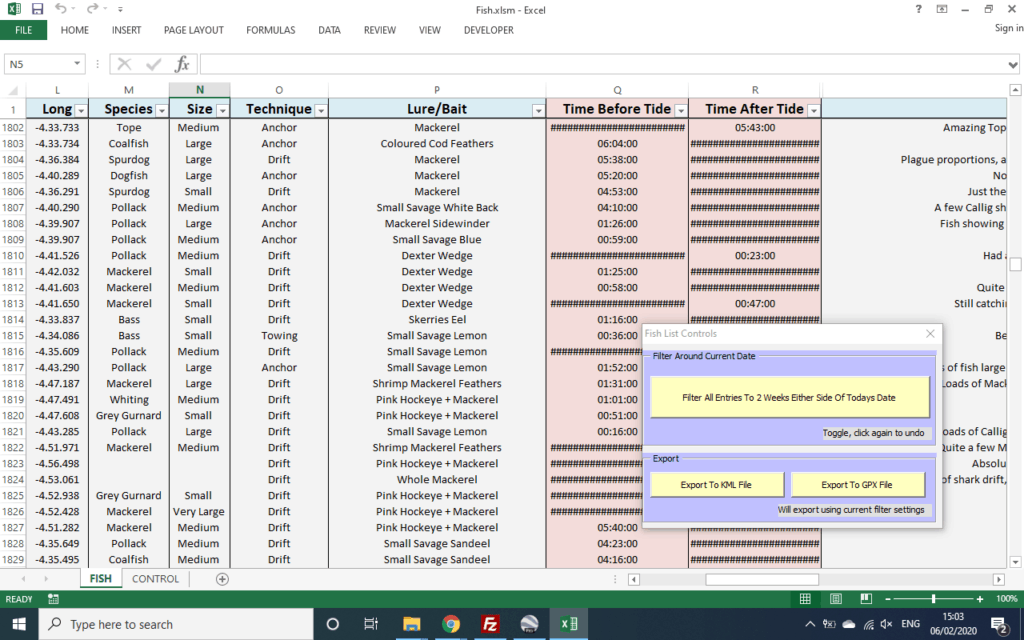
Every column is filtered. Want to know every Cod you’ve caught, then simply filter the Species for Cod only. How about everything that you’ve caught on Lugworm? Filter on Lure/Bait. How about all the Cod you’ve ever caught on Lugworm? Filter on both.
I’ve also added a button that will only show fish caught 2 weeks either side of the current date (in any year). Want to know what you’ve caught this time of year in the past, hit that button and it will show you. This can also be combined with the other filters (e.g. as above to show only Cod etc)

Finally, whilst it’s nice having all this information they say a picture paints a thousand words. That’s the reason why I’ve added a couple of export options. Exporting to KML will create a KML file that can be opened in Google Earth. Opening this will show on a map exactly where you have been catching, including technique and bait info. The other export option is GPX which can then be imported in your GPS unit. Say you are heading out on the boat on Saturday and want to know which areas are holding fish this time of year. It takes 2 button clicks to create a file you can import and have the exact locations marked on your plotter. As hinted at, both exports work on the exact data that has been filtered!


And that’s your lot. Very easy to use, utilises Excels default auto complete behaviour and room for up to 5000 entries. Completely free and no worries of either somebody else having access to your catch data or even worse it all going when the developer gets bored!
You can download the Fishing Log using this link:- Download Free Offline Fishing Log With Data Export
Any questions/problems just leave a comment.